What is a parameter group? It combines multiple
parameters into a shared form – so you record multiple values with
a single tap on the dashboard.
Why Parameter Groups?
Without a group:  Tap Blood pressure → enter value → Save
                  Tap Pulse          → enter value → Save
                  Tap Mood           → enter value → Save
                  → 3 separate actions

With a group:     Tap "Morning Check-in" → 1 form with all 3 fields → Save
                  → 1 action
Typical use cases: - Blood pressure: Systolic +
Diastolic + Pulse - Morning check-in: Sleep quality + Energy + Mood -
Meal companion: Hunger before eating + Satiety afterwards
Creating a New Parameter
Group
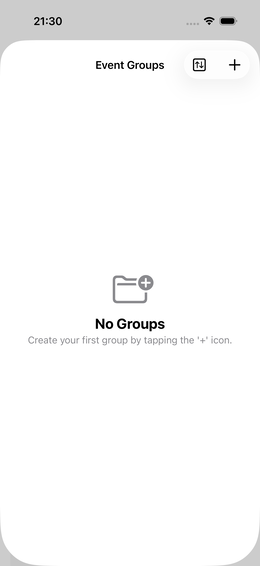
Step 1: Navigate
Settings → Parameter Groups → (Plus)Fig. 32 — Parameter groups: empty list
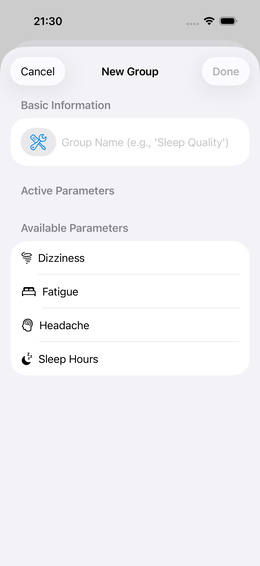
Step 2: Choose Icon and Name
Select a fitting icon and give the group a meaningful name.
💡 The name appears on the dashboard tile – keep it short and clear:
“Blood Pressure”, “Morning”, “Sport”.
Fig. 33 — Group editor: assign name and
icon
Step 3: Select Parameters
You see a list of all available parameters (which you created
beforehand).
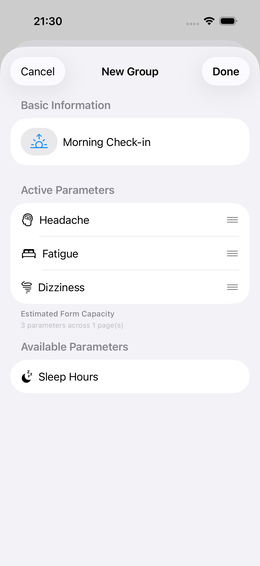
Tap a parameter to add it to the group
It appears in the “active parameters” list
The order in the list = order in the input form
⚠️ Prerequisite: The parameters must already exist. If
not: → Create parametersFig. 34 — Group editor: parameter added
Step 4: Add Sections
(optional)
For groups with many parameters you can insert visual
sections:
Tap the add section icon in the active parameter
list
Optionally enter a section heading (e.g. “Body”, “Mind”)
Arrange parameters within sections via drag
Before / After:
Without sections:         With sections:
  Sleep quality            ── BODY ──
  Energy                     Sleep quality
  Mood                       Energy
  Stress                   ── MIND ──
  Concentration              Mood
                             Stress
                             Concentration
Step 5: Finish
Tap “Done” or navigate back – the group is
saved.
## Adding a Group to the Dashboard
After creating it, the group still needs to be assigned to a
dashboard:
1. Settings → Dashboards → select
dashboard 2. Find the group in the list of “available actions” 3. Tap it
→ it’s added to the active tiles
Tap a group in the parameter groups list → adjust settings.
You can at any time: - Add new parameters - Remove parameters (the
event data for those parameters is preserved) - Change the order -
Rename or delete sections
Templates from the Library
Instead of creating parameter groups manually, you can download
ready-made configurations from the community:
💡 Downloaded groups can still be adjusted after import.
Frequently Asked Questions
Can a parameter be in multiple groups? Yes. A
parameter can be used in any number of groups. All events land in the
same data pool.
Can I have a single parameter on the dashboard alongside a
group? Yes. Example: Pulse is part of the Blood Pressure group,
but can also exist as an individual tile on the dashboard – for
situations where you just want to quickly measure your pulse.
How many parameters per group is sensible? 3–6 is
ideal. More than 8 makes the form unwieldy.
Group tiles can have alarm reminders – directly from the tile or via
the Dashboard editor. → Tile
Reminders
 Parameter Groups
 Settings →
  (Plus)
 Dashboards → select
dashboard 2. Find the group in the list of “available actions” 3. Tap it
→ it’s added to the active tiles
Dashboards → select
dashboard 2. Find the group in the list of “available actions” 3. Tap it
→ it’s added to the active tiles